Showing posts with label Indesign. Show all posts

Monday, 19 May 2014

Indesign

I stupidly lost my memory stick which contained the one and only copies of my Indesign work, (lesson learnt) anyhow this meant that I had to redesign it, something which actually  proved beneficial, as the spreads look a lot better now. 

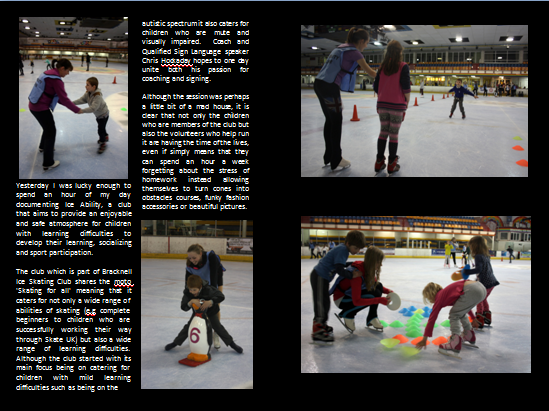
Ice Ability spread, change off the title as its previous name 'Ice Ability' was too literal, removal off one of the subheadings, change of main font, as well as lighting and changing the curves of the photo to produce a more dynamic image. 
same spread just slightly edited images. 

Again image has been altered in photoshop (to make it more dynamic) change of names as previous one 'Jeffrey Holland , A modern day dame' was too literal, slight alteration of text placement. 

complete change when it comes to this spread, removal of one image, and change off the text location, to make it appear less fussy.

ALL IMAGES ARE COPYRIGHT ELLIE HETEBRIJ PHOTOGRAPHY 


Friday, 2 May 2014

Indesign - Ice Ability final draft

Establishing shot, nice use of dead space for title, including byline and captioning.

Second Dps. including three pictures, with captions, and the actual story.

ALL IMAGES ARE COPYRIGHT ELLIE HETEBRIJ

Wednesday, 16 April 2014

Indesign Crit


The original Draft:
Crit included:

- Title 'Modern Day Dame' is not bolder enough, gets lost in the picture maybe go slightly to the left.
- Lack of Captions
- Maybe use less images - so they can be seen clearly
- Use less fonts - using four is to many.
- Portrait formal shot and one on far right are too similar.
- The main type face has a vampire esque feel.
- Consider a different layout more spreadout
- Line up the pictures on the 2nd dps.
- Strong opening image
- 2nd page is strong great layout
- First image on second page works really well looking into the article.
- Great detail in text
- I love this picture story
-The four images running down in a line are very strong.
-Well Written
-Great opening image and subheading
- Love the images and you've included a strong edit, great story
- Article is Informative
-Layout of photos is clear and professional.
 
As you can see not everyone has the same opinion on what a layout should look like, some people thought the second dps was to chaotic whilst others liked It.


Changes that have since been made include:
 
- Removing two of the typefaces leaving only Ariel for the main text and Birch for the title.
 
- Re aligning the images on the 2dps so they are the same level


--------------------------------------------------------------------------------------------------------------

The Second Dps
 
I also created a few drafts of the second dps which is based on our 'touch' project.


Establishing image works well but not keen on title placement. 2nd dps is way to chaotic
 
Establishing image works better with the black background but still not keen.


Nice placement of title and smaller image for 1st dps, but there is a lot of dead space.


Much better 1 dps, title works really well in the bottom left corner- as its otherwise dead space. 2nd dps is much better works really well with the large detail and two smaller images aesthetically a lot more pleasing.


Tuesday, 8 April 2014

Touch- Indesign


For my second Indesign project we have been asked to once again create two double page spreads, this time featuring our work for the 5 piece picture story 'Touch'

Initial ideas


The front cover- first spread


1. This is the introduction page, nice and simply idea full spread of the introductory picture, straight to the point with what its about, features so far only the headline but might add byline and beginning of story. 


The second page so far, includes the majority of the information as a double page spread should. Story will probably change slightly though. I like how the text is all on the one side and well balanced with the imagery. Maybe have a little more of the story inbetween the images on the right side though. 

Wednesday, 26 February 2014

Layouts

Here some more recent updates on my Indesign work for constructing a picture story


 I really like the layout on the right with Jeff shaving his beard/stubble however I don't think it is obvious enough for example the only real hint about him being a dame is the wig, he could just be an actor in a dressing room. The headline could also be more central.

The second dps is good not sure I like all the writing being on the front page though.


I really like both these establishing images but for this module it is preferred that the establishing image is landscape rather than portrait ;(

So far this is the final double page spread, I have reverted back to this first image I used as the establishing shot, as you can see it will work well with the gutter and fold, and the text and headlines fit in well with the negative space without detracting from the image.
The second double page spread opens with a half page portrait of Jeff as the finished product aka Dame Sarah  and then a photographic timeline of his journey through makeup. With a continuation of the story.


ALL IMAGES ARE COPYRIGHT ELLIE HETEBRIJ

Wednesday, 19 February 2014

More Indesign Ideas

Inspired by the work i've been looking at on Issuu i've been creating a few rough examples of layouts. 

Establishing Image

Second Dps 1

I love this one as its very simplistic requires a little bit more writing then the other one, but also clearly shows how he transforms from Jeff to Dame.

Second DPS 2

ALL IMAGES ARE COPYRIGHT ELLIE HETEBRIJ PHOTOGRAPHY

Love the Half page image of Jeff  not sure i'm keen on the rectangular formatting of the four pictures on the other side though.


Scanning Negs as tedious as watching paint dry

As we have been asked to use our previous film work for Dave's project I have been working on some digital scans of my portrait element scans. 

Jeffrey Holland shows of his collection of Dame outfits,Theatre royal Plymouth,  January 2014

Jeffrey Holland as his alter ego, Theatre Royal Plymouth, January 2014 

The Dame's make up collection, Theatre Royal Plymouth, January 2014

Jeffrey Holland prepares his balloon based wig, Theatre Royal Plymouth, January 2014 

Jeffrey blotches his lips. Theatre Royal Plymouth, January 2014 

Jeffrey Holland, Theatre Royal Plymouth, January 2014

ALL IMAGES ARE COPYRIGHT ELLIE HETEBRIJ PHOTOGRAPHY


Tuesday, 18 February 2014

Introduction to Indesign

For our next module with David White we have to master the art of Adobe Indesign, creating magazine style editorial spaces. 

Here are the examples I created in Celine's masterclass (featuring lorem Ipsum and for the last two examples my own pictures)


ALL WORK IS COPYRIGHT ELLIE HETEBRIJ PHOTOGRAPHY

________________________________________________________________________________

The Assignment Brief:

First assignment:
You are to produce 2 single sided A3 sheets  on one story/body of work:
All content to be from negatives shot on previous assignments since beginning of year. Can be any content.
First A3 DPS (Double Page Spread) to use a single establishing image and any other content needed to make a powerful double page opener: eg headline, caption, text, design etc.
Second DPS to be a continuation of same story/body of work, using more than one picture and any other content needed to strengthen layout, eg text, design, quotes, Qr codes, etc etc.
Negatives should be scanned to the highest quality and reproduction should be as fine as you can achieve. I expect your digital mono scans to be better than the best wet prints you could achieve.Do not scan your prints.
Layouts to be done in Adobe Indesign. NO LOREM IPSUM. NO TYPOS.

Remember:
You are the editor, the picture editor, the journalist, the art director, the photographer and the designer of the above pages. Consider your responsibilities carefully. Consider the reader carefully. Every one of the above roles carries equal weight.

________________________________________________

Even though my first idea was to do an article surrounding one of my first shoots (The Pole Fitness Instructor, Person at work) Dave was stressing that this is mostly about the quality of your images over the quality of your text (although this is also important) so I decided/ thought best that I used my male portrait images as these were undoubtedly the strongest out of the first semesters portfolio.


http://issuu.com/theflymagazine/docs/the_fly_july_2013_edition


I love the article to the right from 'The Fly' magazine from the July issue, as even though its an establishing image the editor has used the negative space or in this case the blank page in a creative and effective manner.


.http://issuu.com/dmjx/docs/final_web  

Great establishing image page and secondary page from 'Challenges of Europe' fall 2011, establishing image uses the negative space well to draw you into the story simplistically and dynamically, and then the second DPS uses pictures well to back up the story, however for the page with the six images I would change the formatting slightly so they were central on the page.